Chat Commands
PoE Chat Commands
| Command | Description |
|---|---|
| Enter | Chat |
| /help | Displays a list of most console commands. |
| /bug <description> /debug <description> |
Reports a bug and gives you the report reference number. Additional information can be provided with <description>. |
| /ladder | Displays the top ten characters on the current ladder. |
| /played | Displays the length of time the current character has been played. |
| /age | Displays how long ago the current character was created. |
| /passives | Displays a summary of all passive skill points and the Deal with the Bandits reward the character has gained. |
| /deaths | Displays how many deaths the current character has incurred. |
| /remaining | Displays how many monsters remain alive in the current area. |
| /destroy | Destroys the item on cursor. Use with caution! |
| /recoveroldcraftingbenchitem | Recovers an item placed in now inaccessible Masters and Harvest crafting bench. |
| /itemlevel | Displays the level of the item on cursor. |
| /pvp | Displays Win/Loss/Disconnect statistics for 1v1 and 3v3 PvP. |
| /fixmyhelmet | Updates an existing non-unique helmet to new art. |
| /oos | Forces resync. |
| /dance | Perform a dance. |
| /status <text> | Change your status. Status is displayed to all friends as an alert when changed, and is shown to friends in the social window. |
| /invite <character> | Sends a party invite to <character>. |
| /kick <character> | Kicks <character> from the party. |
| /party_description <description> | Changes the description of the party to <description>. |
| /tradewith <character> | Initiates a trade with <character>. Characters must be in the same town hub instance to trade. |
| /friend <character> | Adds <character> to the friends list. |
| /unfriend <character> | Removes <character> from the friends list. |
| /accept <character> | Accepts friend request. |
| /ignore <character> /squelch <character> |
Adds a player account specified by character name to the ignore list. No messages will be received from ignored players. |
| /unignore <character> /unsquelch <character> |
Removes a player account specified by character name from the ignore list. |
| /clear_ignore_list | Removes all player accounts from the ignore list. |
| /whois <character> | Displays a character’s level, class, league, and whether he is online. |
| /afk <message> | Turns AFK mode on, replying with <message> when someone whispers you. A default message will be used if one isn’t specified. |
| /afkoff | Turns off AFK mode |
| /dnd <message> /donotdisturb <message> |
Toggles Do Not Disturb mode for chat. When on, no messages including whispers will be received. A custom autoreply message will be used if a <message> is added. |
| /global <number> | Joins global chat channel <number>. |
| /trade <number> | Joins trade chat channel <number>. |
| /cls /clear |
Clears the chat console of text. |
| /hideout | Sends you to your hideout. Only useable while in town. |
| /hideout <character> | Sends you to character’s hideout. Only useable while in town. |
| /menagerie | Sends you to your Menagerie. Only useable while in town. |
| /exit | Exits the game to the Character selection screen. |
| /reset_xp | Resets the experience-per-hour estimation tool. |
| /recheck_achievements | Forces a recheck of certain achievements. |
| /autoreply <message> | Replying with <message> when someone whispers you. |
| /delve | Sends you to your Azurite Mine. Only useable while in town. |
| /metamorph | Sends you to Tane’s Laboratory. Only useable while in town. |
| /nochat /togglenochat |
Chat suppression. |
| /save_hideout | Saves the current Hideout layout to a file that can be later loaded or shared. |
| /spectate <character> | Spectate a character. Character must be mutual friend or guildmate. |
Buy PoE 2 Currency Cheap
- Buy PoE 2 Currency Instant Delivery (6% off coupon: z123). Path of Exile item and currency. Payment: PayPal, Skrill, Cryptocurrencies.
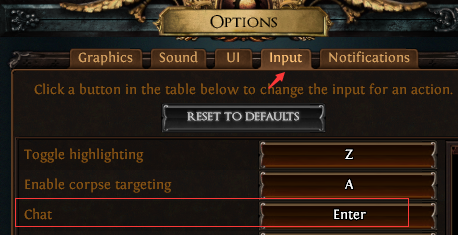
How to change Chat hotkeys
Click o to open the Options window, then select Input menu, next set Chat value.
Chat Command For Skill Points
- /passives
Players can use the command /passives in-game to get a list of passives quests they have already received on that character.
 |
Listed below are all the quests that reward passive tree points. There are 22-24 total, depending on your choices during the Bandit quest.
|
Chat Command To Leave Party
- /kick <character>
You can kick the player and leave the party.
Path of Exile Guides & Tips
- Trespassers PoE
- NBA 2K23 One Will Rise: Season Rewards Players List
- Anomalous Summon Raging Spirit PoE
- Tips for Making WoW Gold Classic
- PoE Blood Ritual Debuff 3.13
- Phantasmal Stormbind PoE
- The King’s Feast PoE Quest Walkthrough Location & Reward
- Deidbellow Prophecy – Dying Cry PoE
- Cartographer’s Sextant Mods & Guide 3.7: Apprentice, Journeyman, Master
- Breathstealer PoE Price & Build – Hydrascale Gauntlets
- Metamorph Brain PoE – Metamorph Samples Guide
- Nocturnal Hideout PoE
- Three Voices Divination Card PoE – Farming Essence
- PoE Convergence Buff Guides
- PoE Lightning Bolt Build Guides 3.13